Loading...

Cara Menampilkan Data dari Database ke Tabel Pada Java

Admin 2:34 PM Add Comment

Penulis kali ini akan membahas Cara Menampilkan Data dari Database ke Tabel Java . Anda memerlukan program MySQL dan Java Netbeans untuk mengikuti Tutorial kali ini . Penulis menggunakan program XAMPP versi 5.5 karena kemudahan dan fleksibilitas untuk mengaktifkan MySQL . Berikut Tutorial Menampilkan Data dari Database ke Tabel Java :

1. Jalankan XAMPP Control Panel dan Aktifkan Apache beserta MySQL 
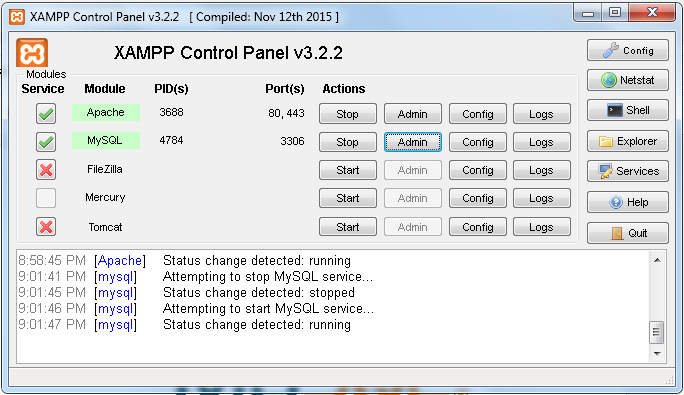

2. Tekan Admin di kolom MySQL dan buat database 'dagang' dengan nama tabel 'ddagang'
3. Isi Tabel dengan konfigurasi seperti gambar dibawah ini
4. Tekan Menu Insert dan isi Nilai Tersebut seperti gambar dibawah ini

5. Sekarang Buka Java Netbeans dan Buat Project Baru , lalu Buat File Baru dengan kategori Swing GUI Forms , JFrame Form

6. Ambil Table di Menu Palette dan Drop di Frame

7. Klik kanan di Table tersebut dan klik Properties , klik [TableModel] 

8. klik di salah satu Title dan klik Insert 2 kali dikarenakan Jumlah Tabel di DB ada 6 kolom

9. Tekan Source 

Isi Codingan :
1. import codingan ini dahulu
import java.sql.*;
import javax.swing.*;
import javax.swing.table.*;

2. letakkan codingan ini tepat diantara class induk dan constructor
    public Connection conn;
    public ResultSet rs;
    public PreparedStatement pst;

3.  beri eksepsi pada konstruktor dan letakkan codingan seperti dibawah ini 
public NewJFrame() throws Exception {
        initComponents();
        conn = null;
        conn = DriverManager.getConnection("jdbc:mysql://localhost/dagang","root","");
        UpdateTabel();
        setLocationRelativeTo(null);
    }

4.  letakkan codingan ini diatas main
private void UpdateTabel() {
        try {
            String sql = "SELECT * FROM ddagang;";
            pst = conn.prepareStatement(sql);
            rs = pst.executeQuery();
            DefaultTableModel dtm = (DefaultTableModel) jTable1.getModel();
        dtm.setRowCount(0);
        String [] data = new String[6];
        int i = 1;
       
        while(rs.next()) {
            data[0] = rs.getString("idbarang");
            data[1] = rs.getString("namabarang");
            data[2] = rs.getString("hargabarang");
            data[3] = rs.getString("stokakhir");
            data[4] = rs.getString("stokmasuk");
            data[5] = rs.getString("stokkeluar");
            dtm.addRow(data);
            i++;
        }
        }
        catch (Exception e) {
            JOptionPane.showMessageDialog(null, e);
        }
    }

5. beri eksepsi pada main seperti dibawah ini
public static void main(String args[]) throws Exception{
                new NewJFrame().setVisible(true);
            }

Dikarenakan Kategori file ini merupakan Swing GUI Forms , maka Full Codingan tidak dapat di copy-paste secara langsung . Namun Pembaca dapat Melihat dan Memastikan Coding yang Anda ketik seperti Full Codingan dibawah ini :

Full Codingan akan seperti ini :
import java.sql.*;
import javax.swing.*;
import javax.swing.table.*;
public class NewJFrame extends javax.swing.JFrame {
    public Connection conn;
    public ResultSet rs;
    public PreparedStatement pst;
   
    public NewJFrame() throws Exception {
        initComponents();
        conn = null;
        conn = DriverManager.getConnection("jdbc:mysql://localhost/dagang","root","");
        UpdateTabel();
    }
    /**
     * This method is called from within the constructor to initialize the form.
     * WARNING: Do NOT modify this code. The content of this method is always
     * regenerated by the Form Editor.
     */             
    @SuppressWarnings("unchecked")
    Generated Code                         
    private void UpdateTabel() {
        try {
            String sql = "SELECT * FROM ddagang;";
            pst = conn.prepareStatement(sql);
            rs = pst.executeQuery();
            DefaultTableModel dtm = (DefaultTableModel) jTable1.getModel();
        dtm.setRowCount(0);
        String [] data = new String[6];
        int i = 1;
       
        while(rs.next()) {
            data[0] = rs.getString("idbarang");
            data[1] = rs.getString("namabarang");
            data[2] = rs.getString("hargabarang");
            data[3] = rs.getString("stokakhir");
            data[4] = rs.getString("stokmasuk");
            data[5] = rs.getString("stokkeluar");
            dtm.addRow(data);
            i++;
        }
        }
        catch (Exception e) {
            JOptionPane.showMessageDialog(null, e);
        }
    }
   
    /**
     * @param args the command line arguments
     */
    public static void main(String args[]) throws Exception{
                new NewJFrame().setVisible(true);
            }
    // Variables declaration - do not modify                    
    private javax.swing.JScrollPane jScrollPane1;
    private javax.swing.JTable jTable1;
    // End of variables declaration                  
}

Setelah dijalankan , akan Keluar Output seperti dibawah ini :

Sekian Tutorial kali ini , Semoga Bermanfaat ya!

Contoh Soal UAS Pemrograman Berorientasi Objek (PBO)

Admin 2:32 PM Add Comment
Dikarenakan penulis baru saja melewati masa Ujian Akhir Semester Mata Kuliah Pemrograman Berorientasi Objek ( PBO ) , maka akan diposting hasil projek yang muncul untuk Program Jurusan Sistem Informasi Semester Dua di Universitas Gunadarma .


Database yang dibutuhkan antara lain :
Database dengan nama : db_nim
Tabel dengan nama : karyawan
1. Nik integer 10 Primary Key
2. Nama varchar 50
3. Alamat varchar 80
4. Notelp varchar 20
5. Jeniskelamin varchar 20
6. Jabatan varchar 50
7. Gapok integer
8. Tunjangan integer
9. Gajitotal integer

Jika ditekan tombol Add , maka Kotak TextField dapat diisi .
Jika ditekan tombol Save , maka Data Karyawan akan disimpan kedalam database .
Jika ditekan tombol Delete , maka Data Karyawan yang telah dipilih akan terhapus dari database .
Jika ditekan tombol Edit , maka Kotak TextField tidak dapat diisi .
Jika ditekan tombol Cancel , maka Program akan kembali ke awal .
Jika ditekan tombol Exit , maka program akan tutup .
Setiap Data Karyawan yang sudah di save akan muncul kedalam tabel


Program ini Penulis bagikan kepada Anda yang akan mengikuti UAS PBO Java maupun sebagai Latihan . Program dapat Anda download DISINI

1. Untuk Menjalankannya , Anda harus meng-extract file tersebut kedalam Folder NetBeans Project Anda
2. Cut Folder 'db_nim' dan Paste kedalam folder xampp . Caranya buka : LocalDisk C > xampp > mysql > data
3. Jalankan NetBeans Anda , dan Open Project dan Klik DataKaryawan

Contoh Program Aplikasi Data Mahasiswa dan Absensi Pada Java

Admin 2:26 PM Add Comment

Penulis kali ini ini akan membagikan Aplikasi Data Mahasiswa yang fungsinya dapat menambah data mahasiswa baru , serta dapat melakukan absensi kehadiran . Di Menu Utama juga terdapat fitur Calendar beserta Analog Time . Aplikasi ini menggunakan Database sehingga disarankan bagi Anda yang ingin mencoba wajib memiliki MySQL . Penulis sendiri menggunakan NetBeans untuk Java dan XAMPP untuk MySQL . Berikut Tampilan dari Aplikasi Data Mahasiswa :

Tampilan Login

Tampilan MenuUtama
Tampilan Daftar Mahasiswa

Tampilan Tambah Data Mahasiswa

Tampilan Daftar Absensi

Database terdiri dari 3 tabel , Tabel pertama untuk user dan password Login . Tabel kedua untuk Daftar Mahasiswa . Tabel ketiga untuk Daftar Absensi . Jika Anda menghapus Data Mahasiswa , maka Data Mahasiswa di Daftar Absensi juga akan terhapus . Di Daftar Absensi , setiap Anda klik 1 Mahasiswa dan klik Hadir , maka Kehadiran Mahasiswa tersebut akan bertambah 1 .

Aplikasi ini dapat Anda download DISINI

1. Untuk Menjalankannya , Anda harus meng-extract file tersebut kedalam Folder NetBeans Project Anda
2. Cut Folder 'datamhs' dan Paste kedalam folder xampp . Caranya buka : LocalDisk C > xampp > mysql > data
3. Jalankan NetBeans Anda , dan Open Project dan Klik AplikasiDataMahasiswa
username = admin
password = admin


Sekian Program kali ini , Semoga Bermanfaat ya!

Cara Menghubungkan Java dengan Database MySQL

Admin 2:22 PM Add Comment
Penulis kali ini akan membahas cara menghubungkan Java Netbeans dengan Database via MySQL . Anda memerlukan program MySQL dan Java Netbeans untuk mengikuti Tutorial kali ini . Penulis menggunakan program XAMPP versi 5.5 karena kemudahan dan fleksibilitas untuk mengaktifkan MySQL . Berikut Tutorial Menghubungkan Java dengan MySQL :

1. Jalankan XAMPP Control Panel dan Aktifkan Apache beserta MySQL 


2. Tekan Admin di kolom MySQL dan buat database 'demo' dengan nama tabel 'student'
3. Isi Tabel dengan konfigurasi seperti di gambar 

4. Jalankan NetBeans dan buat project dengan nama project 'DemoJDBC' dan nama file 'demojdbc'
5. Klik Project lalu klik kanan Menu Libraries dan pilih MySQL JDBC Driver 

6. Masukkan kodingan dibawah ini kedalam file 'demojdbc'

package demojdbc;
import java.sql.*; //menjalankan fungsi SQL
public class DemoJDBC {
    public static void main(String[] args) {
        try {
        // TODO code application logic here
        String Query = "select*from student where rollno = 2";
        // memilih data dari table student dengan rollno 2
        Class.forName("com.mysql.jdbc.Driver");
        Connection con = DriverManager.getConnection("jdbc:mysql://localhost/demo","root","");
        // mengkoneksikan database demo
        Statement st = con.createStatement();
        ResultSet rs = st.executeQuery(Query);
        rs.next();
        String sname = rs.getString(2);
        System.out.println(sname);
        con.close();
        }
        catch (Exception e) {
        }
    }
}

Output yang dihasilkan akan memunculkan data rollno 2 yang berisi Anhar :


Script Code yang diberi warna merah merupakan Script Kunci untuk menghubungkan Java dengan Database MySQL.

Sekian Tutorial kali ini , Semoga Bermanfaat ya!

Contoh Program Konversi Suhu Pada Java GUI

Admin 2:21 PM Add Comment
Penulis kali ini akan membagikan Program Temperature Converter . Program ini akan meminta input dari user yang bersifat numeric dan akan mengkonversi menjadi Fahrenheit , Reamur dan Kelvin . Program ini hanya dapat memproses angka , jika Anda menginput data yang bersifat selain angka , akan menjalankan fungsi catch exception . Berikut Program Konversi Suhu Java GUI buatan Penulis :

Class AplikasiSuhu
import javax.swing.*;
import java.awt.event.*;
public class AplikasiSuhu extends JFrame {
    public AplikasiSuhu() {
        super("Temperature Converter");
                setSize(400,320);
                setDefaultCloseOperation(JFrame.EXIT_ON_CLOSE);
       
        JPanel panel = new JPanel();
       
        JLabel label1 = new JLabel("Celcius         : ");
        JLabel label2 = new JLabel("Fahrenheit   : ");
        JLabel label3 = new JLabel("Reamur        : ");
        JLabel label4 = new JLabel("Kelvin            : ");
       
        JTextField txt1 = new JTextField();
        txt1.setEnabled(true);
        JTextField txt2 = new JTextField();
        txt2.setEnabled(false);
        JTextField txt3 = new JTextField();
        txt3.setEnabled(false);
        JTextField txt4 = new JTextField();
        txt4.setEnabled(false);
       
        JButton btn1 = new JButton("About");
        JButton btn2 = new JButton("Convert");
       
        label1.setBounds(75,40,150,30);
        label2.setBounds(75,90,150,30);
        label3.setBounds(75,140,150,30);
        label4.setBounds(75,190,150,30);
        txt1.setBounds(165,40,150,30);
        txt2.setBounds(165,90,150,30);
        txt3.setBounds(165,140,150,30);
        txt4.setBounds(165,190,150,30);
        btn1.setBounds(100,235,90,30);
        btn2.setBounds(200,235,90,30);
       
        panel.setLayout(null);
        panel.add(label1);
        panel.add(label2);
        panel.add(label3);
        panel.add(label4);
        panel.add(txt1);
        panel.add(txt2);
        panel.add(txt3);
        panel.add(txt4);
        panel.add(btn1);
        panel.add(btn2);
        add(panel);
       
        btn2.setToolTipText("Please enter in Numeric Value");
       
        btn1.addActionListener(new ActionListener(){
            public void actionPerformed (ActionEvent e){
                    JOptionPane.showMessageDialog (null,"App Created by Anhar Panduwinata");
            }
        });
               
        btn2.addActionListener(new ActionListener(){
             int r,f,k,c;
             public void actionPerformed (ActionEvent e){
                 try{
                     c = Integer.parseInt(txt1.getText());
                     f = (((9*c)/5)+32);
                     r = 4*c/5;
                     k = (c+273);
                     txt1.setText(c+" C");
                     txt2.setText(f+" F");
                     txt3.setText(r+" R");
                     txt4.setText(k+" K");
                 }
                 catch (Exception ex) {
                     JOptionPane.showMessageDialog (null,"Please enter in Numeric Value");
                 }
             }
        });
        setVisible(true);
        setLocationRelativeTo(null);
    }
    public static void main (String []Args) {
        AplikasiSuhu app = new AplikasiSuhu();
    }
}

Output yang akan dihasilkan akan seperti ini :


Program jadinya dapat Anda download DISINI
Sekian Program kali ini , Semoga Bermanfaat ya!
sumber:latihanbasisdata.blogspot.com

Contoh Program Diagram Pada Java GUI

Admin 2:18 PM Add Comment
Penulis kali ini akan membagikan Program Diagram 2D yang menggunakan hasil input user untuk ditampilkan kedalam diagram . Program ini masih terbilang newbie , namun Penulis akan mencoba menghasilkan Program Diagram yang lebih sulit dan bagus lagi seperti menghasilkan Diagram yang bersifat 3D dan dapat menyimpan hasil output kedalam Microsoft Word . Berikut Program Diagram 2D Java GUI buatan Penulis :

import java.applet.Applet;
import java.awt.*;
import java.awt.event.*;
import javax.swing.JFrame;
import javax.swing.*;
public class Pie extends Applet implements ActionListener {
 TextField input1, input2, input3,input4;
 Button b1;
 int number[], degrees[];
 int sum, counter;
 public void init()
 {
  sum=0;
  counter=0;
  number=new int[4];
  degrees=new int[4];
 
  JLabel inputlabel=new JLabel("Fill Data in the Blank");
  JLabel nama1=new JLabel("Data 1 : ");
  JLabel nama2=new JLabel("Data 2 : ");
  JLabel nama3=new JLabel("Data 3 : ");
  JLabel nama4=new JLabel("Data 4 : ");
  inputlabel.setBounds(170,280,150,20);
  nama1.setBounds(130,305,50,10);
  nama2.setBounds(130,325,50,10);
  nama3.setBounds(130,345,50,10);
  nama4.setBounds(130,365,50,10);
 
  input1=new TextField(5);
  input2=new TextField(5);
  input3=new TextField(5);
  input4=new TextField(5);
  input1.setBounds(220,300,150,20);
  input2.setBounds(220,320,150,20);
  input3.setBounds(220,340,150,20);
  input4.setBounds(220,360,150,20);
 
  b1=new Button("Draw Piechart");
  b1.setBounds(190,400,90,30);
 
  setLayout(null);
  add(inputlabel);
  add(nama1);
  add(nama2);
  add(nama3);
  add(nama4);
  add(input1);
  add(input2);
  add(input3);
  add(input4);
  add(b1);
  b1.addActionListener(this);
 }
 public void actionPerformed (ActionEvent e) {
     try{
  number[0]=Integer.parseInt(input1.getText());
  number[1]=Integer.parseInt(input2.getText());
  number[2]=Integer.parseInt(input3.getText());
  number[3]=Integer.parseInt(input4.getText());
  sum=number[0]+number[1]+number[2]+number[3];
  degrees[0]=number[0]*360/sum;
  degrees[1]=number[1]*360/sum;
  degrees[2]=number[2]*360/sum;
  degrees[3]=360-degrees[0]-degrees[1]-degrees[2];
  repaint();
     }
     catch(Exception ex){
         JOptionPane.showMessageDialog(null,"Fill in the Blanks with Number");
     }
 }
 public void paint(Graphics g){
     super.paint(g); Graphics2D g2=(Graphics2D) g;
     {
    g.setColor(Color.red);
    g.fillArc(80,60,200,200,0,degrees[0]);
    g.setColor(Color.green);                                      
    g.fillArc(80,60,200,200,degrees[0], degrees[1]);
    g.setColor(Color.blue);
    g.fillArc(80,60,200,200,degrees[0]+degrees[1],degrees[2]);
    g.setColor(Color.cyan);
    g.fillArc(80,60,200,200,degrees[0]+degrees[1]+degrees[2],degrees[3]);
    g2.setColor(Color.black);
    g2.drawString("Legend :", 330, 100);
    g2.setColor(Color.red);
    g2.drawString("Data 1", 330, 130);
    g2.setColor(Color.green);
    g2.drawString("Data 2", 330, 160);
    g2.setColor(Color.blue);
    g2.drawString("Data 3", 330, 190);
    g2.setColor(Color.cyan);
    g2.drawString("Data 4", 330, 220);
     }
 }
 public static void main(String[]args){
     Pie app = new Pie();
     JFrame frame = new JFrame ("Diagram Application");
     frame.getContentPane().add(app);
     frame.setDefaultCloseOperation(JFrame.EXIT_ON_CLOSE);
     frame.setSize(500,480);
     frame.setLocationRelativeTo(null);
     frame.setVisible(true);
     frame.setResizable(false);
     app.init();
     app.repaint();
 }
} 

Hasil Output yang keluar akan seperti berikut ini :


Contoh Program dapat Anda download DISINI

Sekian Program kali ini , Semoga Bermanfaat ya!
Jawaban - Latihan Soal Myob

Jawaban - Latihan Soal Myob

Admin 4:54 PM Add Comment
  1. c. Devidend, sales discount
  2. b. Banking, Spend Money
  3. d. Setup Assistant dan Command Centre
  4. c. Accounting Information
  5. b. Account List 
  6. d. Tombol Create
  7. a. Tombol open
  8. a. Open, Create, Explore, What’s New dan Exit
  9. d. Tombol Explore
  10. d. Data Identitas perusahaan
  11. a. Company Name, Address, Phone Number, Fax Number, Email Address
  12. a. Setup Customer Balance 
  13. c. Perpetual Average
  14. d. Account, Record Journal Entry
  15. b. Sales – Enter Sales
  16. d. Banking – Spend Money
  17. a. Untuk membuat duplikasi data
  18. a. File – Backup
  19. c. Reports, Standard balance sheet
  20. a. Reports, Banking
  21. d. Report - Banking – Statement of cash flow
  22. d. Microsoft word
  23. d. Command center
  24. d. Termin yang pendek
  25. d. Last Month Of Financial Year
  26. c. 6
  27. d. *.txt
  28. d. File = import data = account information
  29. a. Klik Account list
  30. b. Menseting pajak (PNN)
Latihan Soalnya Klik Disini
Soal Myob Lengkap Jawaban

Soal Myob Lengkap Jawaban

Admin 4:44 PM Add Comment
Latihan Soal Pilihan Ganda Materi Myob Beserta Jawaban
  1. Akun berikut ini yang merupakan akun kontra dan harus ditulis negatif dalam setup saldo awal akun adalah….
    a. Accumulation Depreciation, Petty Cash
    b. Account Receivable, Account Payable
    c. Devidend, sales discount
    d. Purchase discount, Cost of sales, Allowance for doubtful
  2. Menu yang digunakan dalam entri transaksi plunasan hutang bank adalah….
    a. Banking, Receive money
    b. Banking, Spend Money
    c. Sales, Receive Payments
    d. Sales, Enter Sales
  3. Pada software MYOB ada 2 menu utama yang digunakan sebagai pokok pengoperasian yaitu…
    a. Setup Assistant dan Sales
    b. Setup Assistant dan Purchase
    c. Setup Assistant dan Customise
    d. Setup Assistant dan Command Centre
  4. Jendela dalam New Company File Assistant yang menanyakan tentang PERIODE AKUNTANSI yang akan dibuat adalah menu …
    a. Introduction 
    b. Account List 
    c. Accounting Information
    d. Company File
  5. Jendela dalam New Company File Assistant yang berisi PILIHAN cara membuat account list adalah menu…
    a. Introduction 
    b. Account List 
    c. Accounting Information
    d. Company File
  6. Salah satu tombol yang digunakan untuk membuat data awal atau data baru pada suatu perusahaan adalah…
    a. Tombol open
    b. Tombol What’s New
    c. Tombol Customise
    d. Tombol Create
  7. Salah satu tombol yang digunakan untuk membuka salah satu data yang sudah dibuat atau sudah dimiliki pada suatu perusahaan adalah…
    a. Tombol open
    b. Tombol What’s New
    c. Tombol Customise
    d. Tombol Create
  8. Setiap anda mengaktifkan program MYOB akan ditampilkan jendelan Welcome to MYOB Accounting dengan tampilan 5 tombol sebagai berikut…
    a. Open, Create, Explore, What’s New dan Exit
    b. Customise, Accounts, Sales, Purchase , dan Payrol
    c. Open, Create, Explore, Accounts dan Exit
    d. Open, Create,What’s New, Accounts dan Exit
  9. Tombol yang berfungsi untuk mengeksplorasi contoh data akuntansi yang disertakan pada waktu anda menginstall MYOB adalah tombol…
    a. Tombol open
    b. Tombol What’s New
    c. Tombol Customise
    d. Tombol Explore
  10. Langkah pertama dalam pengoperasian MYOB anda akan menggunakan fasilitas tombol create yang selanjutnya anda diminta untuk menginputkan data sebagai berikut…
    a. Data Accouts
    b. Data Supplier
    c. Data Customers
    d. Data Identitas perusahaan
  11. Enter Information about your company adalah merupakan pernyataan pada tahap awal dalam pembuatan data perusahaan yang pada intinya berisi tentang pengisian data sebagai berikut…
    a. Company Name, Address, Phone Number, Fax Number, Email Address
    b. Company Name, Lay Out, Current Finacial Years, Adress, Conversion Month
    c. Company Name, Number of accounting Periods, Address, Phone number, Fax Number
    d. Company Name, Address, Phone Number, Lay Out, Accounts Number
  12. Kita dapat menginput saldo awal pelanggan dari jendela ...
    a. Setup Customer Balance 
    b. Historical Sale 
    c. Accounts Opening Balance
    d. Setup Supplier Balance
  13. Dalam MYOB penilaian persediaan menggunakan metode
    a. Perpetual FIFO 
    b. Perpetual LIFO 
    c. Perpetual Average
    d. Periodic
  14. Menu yang digunakan dalam entri transaksi penyesuaian perelengkapan adalah….
    a. Banking, Record Journal Entry
    b. Banking, Spend Money
    c. Sales, Receive Payments
    d. Account, Record Journal Entry
  15. Langkah awal untuk mencatat transaksi penjualan secara tunai …
    a. Sales – Receive Payment 
    b. Sales – Enter Sales
    c. Purchases – Pay Bills
    d. Purchases – Enter Purchases
  16. Dibayar kepada kantor kas Negara, Utang PPN sebesar Rp. 500.000,- dengan nomor BJB-01. Langkah awal untuk mencatat transaksi tersebut adalah melalui jendela …
    a. Sales – Receive Payment 
    b. Sales – Enter Sales
    c. Purchases – Pay Bills
    d. Banking – Spend Money
  17. Manfaat melakukan backup File adalah …
    a. Untuk membuat duplikasi data
    b. Untuk mengexplorasi data
    c. Untuk menghapus data
    d. Untuk mengexport data
  18. Langkah awal untuk membuat backup data adalah ...
    a. File – Backup
    b. Edit – Backup
    c. Lists – Backup
    d. Setup – Backup
  19. Menu yang digunakan untuk mencetak neraca adalah ….
    a. Reports, Banking, standard balance sheet
    b. Reports, Account, standard balance sheet
    c. Reports, Standard balance sheet
    d. Reports, Banking,balance sheet
  20. Menu yang digunakan untuk mencetak statement of cash flow adalah ….
    a. Reports, Banking
    b. Reports, Account
    c. Reports, Bank register
    d. Reports, Banking,balance sheet
  21. Untuk mengetahui laporan arus kas dengan program Myob dengan cara…
    a. Reports – Accounts pilih dan klik. Profit & loss (Accrual
    b. Reports – Accounts pilih dan klik. Standar balance sheet
    c. Reports – Accounts pilih dan klik. General Journal
    d. Report - Banking – Statement of cash flow
  22. Berikut dibawah ini yang bukan software akuntasi adalah ...
    a. Myob
    b. Accurate accounting
    c. Microsoft Accounting exspres
    d. Microsoft word
  23. Menu Utama dari MYOB disebut ...
    a. Command button
    b. Command panel 
    c. Main center
    d. Command center
  24. Berikut ini yang bukan Kelebihan Software Myob Versi 18 adalah ...
    a. Mudah Untuk digunakan
    b. Pengolahan perhitungan akuntasi yang akurat dan tepat
    c. Software yang muah untuk UKM
    d. Termin yang pendek
  25. Menu untuk mengisi tahun transksi pada Accounting Informtion adalah ...
    a. Calender Year
    b. Number Of Accounting Period
    c. Counveersion Month
    d. Last Month Of Financial Year
  26. Ada berapa fitur pada tampilan depan Myob Versi 18 ...
    a. 5 
    b. 4
    c. 6 
    d. 8
  27. Pada saat ingin menyimpan daftar akun yang telah di ketik dari Microsoft Excel, maka kita harus menyimpan dengan kode ekstensi ..
    a. *.exe 
    b. *.ppt
    c. *.xls e. 
    d. *.txt
  28. Berikut ini cara-cara emngimport data dari excel yang benar adalah ...
    a. File = export data = account information
    b. File = export data = budgets
    c. File = import data = budgets
    d. File = import data = account information
  29. Cara unutuk melihat hasil pemindahan daftar akun pada fitur “Accounts” adalah ...
    a. Klik Account list
    b. Klik Send to accountment
    c. Klik Company data auditor
    d. Klik Transaction jurnal
  30. Tax Codes digunakan untuk ...
    a. Mengisi pajak
    b. Menseting pajak (PNN)
    c. Menambah jumlah pajak
    d. Memperhitungkan pajak
Jawabannya Klik Disini
 Soal Etika Administrasi Pemerintahan Lengkap Jawaban

Soal Etika Administrasi Pemerintahan Lengkap Jawaban

Admin 4:39 PM Add Comment
Latihan Soal Pilihan Ganda Materi Etika Administrasi Pemerintahan Beserta Jawaban
  1. Jhon Locke membuat Tritantra untuk membalas pendapat Sir Robert Filmer yang tidak mengakui kebebasan alami rakyat, karena rakyat dianggap sebagai…
    1) Kaum yang menentukan
    2) Budak-budak belian
    3) Tidak mempunyai hak apa-apa
    a. Jika jawaban 1 dan 2 benar
    b. Jika jawaban 1 dan 3 benar
    c. Jika jawaban 2 dan 3 bnar
    d. Jika jawaban 1, 2, dan 3 benar semua
     
  2. Hukum diciptakan dengan tujuan menciptakan…
    1) Ketertiban di dalam kehidupan masyarakat
    2) Ketentraman dan ketenangan hidup
    3) Kekuasaan yang absolut bagi penguasa
    a. Jika jawaban 1 dan 2 benar
    b. Jika jawaban 1 dan 3 benar
    c. Jika jawaban 2 dan 3 benar
    d. Jika jawaban 1, 2 dan 3 benar semua
     
  3. Di bawah ini yang dapat menjadi faktor penghambat atau kendala yang dapat mempengaruhi kinerja penyelenggara penegakan hukum di Indonesia adalah…
    1) Sistem perundangan belum memadai
    2) Kepentingan yang melekat pada aparat pelaksana
    3) Corspsgeist dalam institusi
    a. Jika jawaban 1 dan 2 benar
    b. Jika jawaban 1 dan 3 benar
    c. Jika jawaban 2 dan 3 benar
    d. Jika jawaban 1, 2, dan 3 benar semua
     
  4. Di bawah ini yang merupakan asas penegakan etika penyelenggara negara adalah …
    1) Kepastian hukum
    2) Sanksi hukum
    3) Tertib penyelenggaraan hukum
    a. Jika jawaban 1 dan 2 benar
    b. Jika jawaban 1 dan 3 benar
    c. Jika jawaban 2 dan 3 benar
    d. Jika jawaban 1, 2, dan 3 benar semua
     
  5. Laporan harta kekayaan penyelenggara negara ( LHKPN ) memuat data tentang …
    1) Harta bergerak
    2) Piutang
    3) Utang
    a. Jika jawaban 1 dan 2 benar
    b. Jika jawaban 1 dan 3 benar
    c. Jika jawaban 2 dan 3 benar
    d. Jika jawaban 1, 2, dan 3 benar semua
     
  6. Hampir semua segi praktik pemerintahan banyak sekali terjadi praktik penyelewengan dan korupsi, antara lain terjadi di lembaga…
    1) Eksekutif
    2) Legislatif
    3) Yudikatif
    a. Jika jawaban 1 dan 2 benar
    b. Jika jawaban 1 dan 3 benar
    c. Jika jawaban 2 dan 3 benar
    d. Jika jawaban 1, 2, dan 3 benar semua
     
  7. Penilaian norma etika sangat dipengaruhi oleh…
    1) Suasana
    2) Waktu
    3) Tempat
    a. Jika jawaban 1 dan 2 benar
    b. Jika jawaban 1 dan 3 benar
    c. Jika jawaban 2 dan 3 benar
    d. Jika jawaban 1, 2, dan 3 benar semua
     
  8. Ilmu pengetahuan yang mempelajari tentang kehidupan susila manusia adalah ….
    a. Sosiologi
    b. Hukum
    c. Filsafat
    d. Etika
     
  9. Berikut ini yang bukan bagian dari asas-asas umum pemerintahan menurut Crince Le Roy adalah asas ….
    a. Kepastian hukum
    b. Keseimbangan
    c. Kesamaan
    d. Kebijaksanaan
     
  10. Lisensi atau izin terhadap sesuatu yang dibuat oleh pemerintah tidak dapat ditarik kembali bila telah memenuhi syarat formil maupun material. Hal ini sesuai dengan asas ….
    a. Keseimbangan
    b. Kepastian hukum
    c. Kesamaan
    d. Kebijaksanaan
     
  11. Perjanjian kerja jangka pendek berdasarkan undang-undang nomor 1 tahun 1967 tentang penanaman modal asing, termasuk contoh perbuatan hukum publik bersisi …
    a. Satu
    b. Dua
    c. Tiga
    d. Empat
     
  12. Seorang pedagang kaki lima yang menggunakan trotoar untuk berjualan dan tidak mengindahkan hak pejalan kaki termasuk perbuatan yang …
    a. Tidak melanggar hukum
    b. Absah saja menurut aturan
    c. Layak menurut kebiasaan di negeri ini 
    d. Menyalahgunakan hak
     
  13. Yang tidak termasuk perbuatan red tape dalam administrasi pemerintah adalah …
    a. Formalitas yang berlebihan
    b. Prosedur yang sangat birokratis
    c. Pembuatan KTP yang berbelit-belit
    d. Kewajiban berpakaian rapi di dalam kantor
     
  14. Pratik licik/chicane lebih sering terjadi pada…
    a. Pelaksanaan aturan formal yang sangat terperinci dan mengatur sampai detail
    b. Individu yang memiliki hak yang lebih dibanding yang lain
    c. Pejabat pemerintah yang bertindak secara jujur dan konsekuen
    d. Tindakan pemerintah yang sesuai dengan dengan aturan atau undang-undang
     
  15. Praktik-praktik ‘licik’ dalam perbuatan pemerintah dilarang karena…
    a. Masyrakat belum terbiasa dengan praktik tersebut
    b. Masyarakat tidak terbiasa dengan praktik tersebut 
    c. Membahayakan dan merusak syarat kejujuran dan keterbukaan
    d. Masyarakat tidak peduli dengan praktik-praktik tersebut
     
  16. Agar manusia dapat memenuhi kebutuhan dan kepentingannya sebaik mungkin maka dibutuhkan suasana dalam masyarakat yang…
    a. Tentram dan tenang
    b. Bellum omnium contra omnes 
    c. Homo homini lupus
    d. Tanpa hukum
     
  17. Filsafat Plato dikatakan sebagai filsafat normatif, sebab…
    1) Plato menganggap dunia ide menjadi norma bagi dunia alam
    2) Plato menganggap dunia alam sebagai pantulan sempurna dari kesempurnaan dunia ide
    3) Plato menganggap dunia ide merupakan dasar kesempurnaan bagi dunia alam
    a. Jika jawaban 1 dan 2 benar
    b. Jika jawaban 1 dan 3 benar
    c. Jika jawaban 2 dan 3 benar
    d. Jika jawaban 1, 2, dan 3 benar semua
     
  18. Hukum privat disebut juga…
    1) Cieviel recht
    2) Privaatrecht
    3) Hukum Perdata
    a. Jika jawaban 1 dan 2 benar
    b. Jika jawaban 1 dan 3 benar
    c. Jika jawaban 2 dan 3 benar
    d. Jika jawaban 1, 2, dan 3 benar semua
     
  19. Kata “kebijaksanaan” mengandung arti…
    1) Kepandaian menggunakan akal budi
    2) Kecakapan bertindak bila menghadapi orang lain
    3) Asusila perbuatan-perbuatan
    a. Jika jawaban 1 dan 2 benar
    b. Jika jawaban 1 dan 3 benar
    c. Jika jawaban 2 dan 3 benar
    d. Jika jawaban 1, 2, dan 3 benar semua
     
  20. Yang dimaksud dengan cacat yuridis dalam pembentukan kehendak yaitu cacat yuridis karena…
    1) “Salah kira”
    2)  Paksaan
    3)  Tipuan
    a. Jika jawaban 1 dan 2 benar
    b. Jika jawaban 1 dan 3 benar
    c. Jika jawaban 2 dan 3 benar
    d. Jika jawaban 1, 2, dan 3 benar semua
     
  21. Aturan perbuatan dan perilaku yang keadaanya dianggap sudah sempurna adalah aturan…
    a. Kebiasaan
    b. Agama
    c. Adat
    d. Hukum
     
  22. Seorang filosof selalu mencari pengetahuan tiada henti-hentinya, berfikir tentang segala sesuatu disekelilingnya yang belum diketahui, sebab seorang filosof…
    a. Selalu berfikir
    b. Adalah orang cerdas
    c. Mencintai pengetahuan
    d. Selalu ingin memuaskan rasa ingin tahunya
Jawaban:
  1. c. Jika jawaban 2 dan 3 benar
  2. a. Jika jawaban 1 dan 2 benar
  3. d. Jika jawaban 1, 2, dan 3 benar semua
  4. b. Jika jawaban 1 dan 3 benar
  5. d. Jika jawaban 1, 2, dan 3 benar semua
  6. d. Jika jawaban 1, 2, dan 3 benar semua
  7. d. Jika jawaban 1, 2, dan 3 benar semua
  8. d. Etika
  9. d. Kebijaksanaan
  10. b. Kepastian hukum
  11. b. Dua
  12. d. Menyalahgunakan hak
  13. d. Kewajiban berpakaian rapi di dalam kantor
  14. a. Pelaksanaan aturan formal yang sangat terperinci dan mengatur sampai detail
  15. c. Membahayakan dan merusak syarat kejujuran dan keterbukaan
  16. a. Tentram dan tenang
  17. b. Jika jawaban 1 dan 3 benar
  18. d. Jika jawaban 1, 2, dan 3 benar semua
  19. a. Jika jawaban 1 dan 2 benar
  20. d. Jika jawaban 1, 2, dan 3 benar semua
  21. b. Agama
  22. a. Selalu berfikir
It's possible to trade profitably on the Forex, the nearly $2 trillion worldwide currency exchange market. But the odds are against you, even more so if you don't prepare and plan your trades. According to a 2014 Bloomberg report, several analyses of retail Forex trading, including one by the National Futures Association (NFA), the industry's regulatory body, concluded that more than two out of three Forex traders lose money. This suggests that self-education and caution are recommended. Here are some approaches that may improve your odds of taking a profit. Prepare Before You Begin Trading Because the Forex market is highly leveraged -- as much as 50 to 1 -- it can have the same appeal as buying a lottery ticket: some small chance of making a killing. This, however, isn't trading; it's gambling, with the odds long against you. A better way of entering the Forex market is to carefully prepare. Beginning with a practice account is helpful and risk-free. While you're trading in your practice account, read the most frequently recommended Forex trading books, among them Currency Forecasting: A Guide to Fundamental and Technical Models of Exchange Rate Determination, by Michael R. Rosenberg is short, not too sweet and highly admired introduction to the Forex market. Forex Strategies: Best Forex Strategies for High Profits and Reduced Risk, by Matthew Maybury is an excellent introduction to Forex trading. The Little Book of Currency Trading: How to Make Big Profits in the World of Forex, by Kathy Lien is another concise introduction that has stood the test of time. All three are available on Amazon. Rosenberg's book, unfortunately, is pricey, but it's widely available in public libraries. "Trading in the Zone: Master the Market with Confidence, Discipline and a Winning Attitude," by Mark Douglas is another good book that's available on Amazon, and, again, somewhat pricey, although the Kindle edition is not. Use the information gained from your reading to plan your trades before plunging in. The more you change your plan, the more you end up in trouble and the less likely that elusive forex profit will end up in your pocket. Diversify and Limit Your Risks Two strategies that belong in every trader's arsenal are: Diversification: Traders who execute many small traders, particularly in different markets where the correlation between markets is low, have a better chance of making a profit. Putting all your money in one big trade is always a bad idea. Familiarize yourself with ways guaranteeing a profit on an already profitable order, such as a trailing stop, and of limiting losses using stop and limit orders. These strategies and more are covered in the recommended books. Novice traders often make the mistake of concentrating on how to win; it's even more important to understand how to limit your losses. Be Patient Forex traders, particularly beginners, are prone to getting nervous if a trade does not go their way immediately, or if the trade goes into a little profit they get itchy to pull the plug and walk away with a small profit that could have been a significant profit with little downside risk using appropriate risk reduction strategies. In "On Any Given Sunday," Al Pacino reminds us that "football is a game of inches." That's a winning attitude in the Forex market as well. Remember that you are going to win some trades and lose others. Take satisfaction in the accumulation of a few more wins than losses. Over time, that could make you rich!
No car insurance resource would be complete without a comprehensive glossary of car insurance terms. We've compiled a list of terms and their definitions to better help you navigate the sometimes confusing world of insurance Accident - This is an unexpected sudden event that causes property damage to an automobile or bodily injury to a person. The event may be an at-fault or not-at fault and it may be report or unreported. An accident involving two vehicles may be termed a collision. Accident report form - This is the report filed by police, often called the police report, containing the important information regarding the vehicle collision. This report will include the names of all individuals involved, vehicles involved, property damaged and citations that were issued. Adjuster - This is the person who will evaluate the actual loss reported on the policy after an accident or other incident. They will make the determination on how much will be paid on the auto insurance policy by the Insurer. Agent - This is a licensed and trained individual who is authorized to sell and to service insurance policies for the auto insurance company. At Fault - This is the amount that you, the policy holder, contributed or caused the auto collision. This determines which insurance agency pays which portion of the losses. Auto Insurance Score - This is a score similar to credit score that evaluates the information in your consumer credit report. These scores are used when determining pricing for your auto insurance policy. Negative marks on your credit report can increase your auto insurance premiums. The use of this information to determine policy pricing does vary from state to state. Automobile Insurance - This is a type of insurance policy that covers and protect against losses involving automobiles. Auto Insurance policies include a wide range of coverage's depending on the policy holders needs. Liability for property damage and bodily injury, uninsured motorist, medical payments, comprehensive, and collision are some of the common coverage's offered under an auto insurance policy. Binder - This is a temporary short-term policy agreement put in place while a formal permanent policy is put into place or delivered. Bodily Injury Liability - This is the section of an insurance policy that covers the cost to anyone you may injure. It can include lost wages and medical expenses. Broker - This is a licensed individual who on your behalf sells and services various insurance policies. Claim - This is a formal notice made to your insurance company that a loss has occurred which may be covered under the terms of the auto insurance policy. Claims Adjuster - This person employed by the insurance agency will investigate and settle all claims and losses. A representative for the insurance agency to verify and ensure all parties involved with the loss, get compensated fairly and correctly. Collision - The portion of the insurance policy that covers damage to your vehicle from hitting another object. Objects can include but are not limited to; another vehicle, a building, curbs, guard rail, tree, telephone pole or fence. A deductible will apply. Your insurance company will go after the other parties insurance policy for these cost should they be at fault. Commission - This is the portion of the auto insurance policy that is paid to the insurance agent for selling and servicing the policy on behalf of the company. Comprehensive - This is a portion of the insurance policy that covers loss caused by anything other than a collision or running into another object. A deductible will apply. This includes but is not limited to vandalism, storm damage, fire, theft, etc. Covered loss - This is the damage to yourself, other people or property or your vehicle that is covered under the auto insurance policy. Declarations Page - This is the part of the insurance policy that includes the entire legal name of your insurance company, your full legal name, complete car information including vehicle identification numbers or VIN, policy information, policy number, deductible amounts. This page is usually the front page of the insurance policy. Deductible Amount - This is the portion of the auto insurance policy that is the amount the policy holder must pay up front before the Insurance Company contributes and is required to pay any benefits. This amount can be within a wide range in price and varies from approximately $100 - $1000. The larger amount you pay in a deductible the lower your normal monthly/yearly policy will cost. This is the portion of the auto insurance policy that would be applicable only to comprehensive or collision coverage. Discount - This is a reduction in the overall cost of your insurance policy. Deductions can be given for a variety of different reasons including a good driving record, grades, age, marital status, specific features and safety equipment on the automobile. Emergency Road Service - This is the part of an auto insurance policy that covers the cost of emergency services such as flat tires, keys locked in the car and towing services. Endorsement - This is any written change that is made to the auto insurance policy that is adding or removing coverage on the policy. Exclusion - This is the portion of the auto Insurance policy that includes any provision including people, places or things that are not covered under the insurance policy. First Party - This is the policyholder, the insured in an insurance policy. Gap Insurance - This is a type of auto insurance provided to people who lease or own a vehicle that is worth less than the amount of the loan. Gap auto Insurance will cover the amount between the actual cash value of the vehicle and the amount left on loan should the care be stolen or destroyed. High-Risk Driver - If you have a variety of negative marks on your insurance record including driving under the Influences, several traffic violations, etc. you may be labeled as a risk to the insurance company. This will increase your insurance policy or may make you ineligible for coverage. Insured - The policyholder (s) who are covered by the policy benefits in case of a loss or accident. Insurer - Is the Auto Insurance company who promises to pay the policy holder in case of loss or accident. Liability insurance - This part of an auto insurance policy which legally covers the damage and injuries you cause to other drivers and their vehicles when you are at fault in an accident. If you are sued and taken to court, liability coverage will apply to your legal costs that you incur. Most states will require drivers to carry some variation of liability coverage Insurance and this amount will vary state by state. Limits - This is the portion of the auto insurance policy that explains and lists the monetary limits the insurance company will pay out. In the situation you reach these limits the policy holder will be responsible for all other expenses. Medical Payments Coverage - This is the portion of an auto insurance policy that pays for medical expenses and lost wages to you and any passengers in your vehicle after an accident. It is also known as personal injury protection or PIP. Motor Vehicle Report - The motor vehicle report or MVR is a record issued by the state in which the policy holder resides in that will list the licensing status, any traffic violations, various suspensions and./ or refractions on your record. This is one of the tools used in determining the premium prices offered by the insurance agency. This is also used to determine the probability of you having a claim during your policy period. No-Fault Insurance - If you reside within a state with no-fault insurance laws and regulations, your auto insurance policy pays for your injuries no matter who caused the accident. No-fault insurance states include; Florida, Hawaii, Kansas, Kentucky, Massachusetts, Michigan, Minnesota, New Jersey, New York, North Dakota, Pennsylvania, Utah and Washington, DC.. Non-Renewal - This is the termination of an auto insurance policy on the given expiration date. All coverage will cease as of this date and insurer will be released of promised coverage. Personal Property Liability - This is the portion of the auto insurance policy that covers any damage or loss you cause to another person's personal property. Personal Injury Protection or PIP - This portion of an auto insurance policy pays for any lost wages or medical expenses to you and any passengers in your vehicle following an accident. PIP is also known as medical payments coverage. Premium - This is the amount charged to you monthly, yearly or any other duration agreed upon by insurance company and policy holder and paid directly to the auto insurance company. A premium is based on the type and amount of coverage you choose for your vehicle(s) and yourself. Other factors that will affect your insurance premium prices include your age, marital status, you're driving and credit report, the type of car you drive and whether you live in an urban or rural area. Premiums vary by insurance company and the location you live. Quotation - This is the amount or estimated amount the insurance will cost based on the information provided to the agent, broker or auto insurance company. Rescission.- This is the cancellation of the insurance policy dated back to its effective date. This would result in the full premium that was charged being returned. Rental Reimbursement - This is the portion of the auto insurance policy that covers the cost of an automobile rental of similar size should the covered vehicle be in repair from a reported incident. Replacement Cost - This is the amount of money it would cost to replace a lost or damaged item at it is actually new replacement value. This monetary amount would be based on a new identical item in the current local market. Salvage - This is the auto insurance policy holders property that is turned over tot eh insurance agency in a loss final settlement. Insurance companies will sell the salvage property in hopes to recoup some of its monetary loss due to the loss and settlement. Second Party - this is the actual insurance company in the auto insurance policy. Surcharge - This is the amount added to your auto insurance policy premium after a traffic violation or an accident in which you were found to be at fault. Third Party - This is another person other than the policy holder and auto insurance company who has faced a loss and may be able to collect and be compensated on behalf of the policy holder's negligence. Total Loss - This is complete destruction to the insured property of a policy holder. It has been determined that it would be a great sum of money to repair the item rather than replace the insured piece of property to its state prior to the loss. Towing Coverage - This is the portion of the auto insurance policy that covers a specified amount for towing services and related labor costs. Under insured Driver - This is the portion of an auto insurance policy which covers injuries to you caused by a driver without enough insurance to pay for the medical expenses you have incurred from the accident. This is portion of the policy can vary state by state as some states include damage to the car in this section. Uninsured Driver or Motorist - This is the portion of the auto insurance policy which covers injuries to you caused by a driver who was without liability insurance at the time of the accident. Uninsured driver or motorist coverage comes in two different sections; uninsured motorist bodily injury and uninsured motorist property damage. Uninsured motorist bodily injury coverage covers the injuries to you or any passenger in your vehicle when there is an accident with an uninsured driver. Uninsured motorist property damage coverage covers the cost for the property damage to your vehicle when there is an accident with an identified uninsured driver. Uninsured driver or motorist coverage must be offered when you purchase the required liability coverage for your vehicle. You must sign a declination waiver if you decline Uninsured driver or motorist coverage. The majority of states require drivers to carry some form of uninsured motorist coverage. Some states include damages to your car in this coverage. Vehicle Identification Number or VIN - A VIN is a 17 letter and number combination that is the identification of the specific vehicle. It will identify the make, modem and year of the automobile. This number is typically located on the driver's side window on the dash. It can also be found on the vehicles registration and title